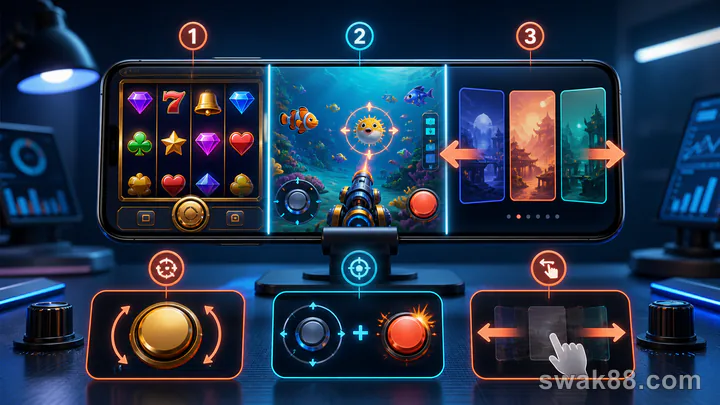
Test the gameplay layer, not the marketing layer
JILI apps casino searches often lead to operator apps that carry JILI-made slots and fishing games rather than one universal JILI consumer app. Test the exact operator build and game instance you will use. A useful Android test asks whether slot controls fit the screen, fishing shots have visible cost, and switching between lobby categories preserves balance and selected settings.
This guide does not recommend installing from an unknown source. It assumes the app or browser version is already available through the operator route you selected and focuses only on gameplay behavior.
What to test
Use three formats:
- A portrait slot such as a generic five-reel JILI-style title.
- A fishing game with adjustable cannon power.
- The lobby path between Slots, Fishing, and recent games.
Use demo mode when available. If testing with cash, use one low stake and a strict limit of five slot spins plus ten fishing shots.
Slot test: controls and result reading
Start with the slot in portrait orientation. Open its paytable and identify paylines or ways, wilds, scatters, free-spin trigger, RTP if shown, and total bet.
Set the minimum stake and play five manual spins. For each spin, verify the deduction before animation and the credited amount after it settles. Disable turbo, autoplay, and feature purchase.
Rotate to landscape and back. On an entry-level Android phone, check whether the Spin button, stake selector, paytable, and balance remain accessible. Some games are optimized for portrait; forcing landscape can shrink text without adding useful space.
Return to the lobby, reopen the same slot, and confirm whether the stake persists. Persistence is acceptable only when the amount remains visible. A silent increase or hidden denomination is a fail.
Fishing test: translate fire rate into cost
Fishing games have no natural spin boundary. Each shot consumes credits, and holding Fire can generate many stakes per second.
Select the lowest cannon value and fire ten single shots at one target class. Record starting balance, shot cost, number of shots, and returned credits. Then increase cannon power one step and confirm the new cost before firing.
Do not infer probability from target size, color, or visible hit effects unless the rules publish a relationship. A large creature can absorb many shots, and screen effects do not reveal the underlying return model.
The test passes when shot cost is always visible, touch response does not double-fire, and balance changes can be reconciled. It fails when cannon value changes unexpectedly after a reconnect or the fire button continues after the finger lifts.
Lobby-switching test
From Fishing, return to the main lobby and open Slots. Then use Recent or History to return to the fishing title. Repeat the sequence twice.
Record:
- Time to usable lobby.
- Time to reopen each game.
- Whether balance matches before and after the switch.
- Whether the last stake or cannon value persists visibly.
- Whether the back button exits the game or the whole app.
Budget phones may unload one game engine when another opens. Reloading is not a failure. Incorrect state, duplicate rounds, or an inaccessible history is.
Network handoff
Start on Wi-Fi. Finish a slot spin, return to the lobby, then switch to mobile data. Wait for the lobby to refresh before launching fishing. After ten shots, return to the lobby and switch back.
Never change networks during a confirmed paid action. If the connection drops after a spin or shot, wait for history and balance. Do not repeat the action because the animation was missing.
Philippine prepaid data makes asset size relevant. Check Android's per-app data counter before and after the test. The first run can be larger because art and audio are downloaded; repeat later to see cached behavior.
Performance on an entry-level Android phone
Watch four signals: launch time, frame drops, touch delay, and heat. A slot can tolerate minor frame reduction if controls remain accurate. A fishing game cannot tolerate delayed Fire release because it changes spending.
Background the app for 30 seconds and reopen it. The game may reconnect, but it should restore a consistent balance. If the phone becomes hot and game switching repeatedly reloads, compare the browser version or use shorter sessions.
Our 10-minute update and session-restore test provides a separate checklist for behavior after an app update.
Ten-point scorecard
- Slot total bet visible.
- Paytable readable on the phone.
- Manual Spin registers once.
- Balance settles clearly.
- Reopened stake is visible and correct.
- Fishing shot cost visible.
- Fire button stops immediately.
- Cannon changes require a deliberate tap.
- Lobby switching keeps balance consistent.
- Network handoff completes between actions.
Score eight or more before choosing the app for a normal session. At six or seven, compare browser play. Below six, the build does not fit the phone or connection.
Final recommendation
Use JILI-style portrait slots when one-handed controls and short spins work cleanly. Use fishing games only when you can cap shot value and count; continuous fire makes cost per minute more important than cost per tap. Treat the lobby as part of gameplay: a good app returns to the right category, keeps the balance consistent, and makes persisted stakes obvious.
Repeat the test after updates because controls, caching, and game-engine versions can change. The result applies to the exact app build, Android phone, and network used—not every app carrying the same provider's games.
Common mobile mistakes
Holding Fire while changing cannon power
Some fishing interfaces apply the new value immediately. Release Fire, confirm the displayed cost, then resume. Otherwise the transition produces a mixed-cost sequence that is difficult to audit.
Treating lobby balance as settled history
After a network interruption, the lobby may appear before the last game record refreshes. Open history and wait. Do not repeat a spin or shot because its animation was missing.
Comparing cached and uncached launches
The first game launch downloads art and audio; the second may use cache. When comparing two apps, cold-launch both under similar conditions or record first and repeat times separately.
A second-day check
Repeat five slot spins and ten fishing shots the next day at the same values. Compare touch duplication, average launch time, balance reconciliation, and per-app data. Do not compare wins. If controls remain stable but outcomes differ, that is normal random variation. If stake persistence or shot cost changes, the build needs investigation.
Who should choose browser play instead?
Use browser or PWA when the installed build repeatedly overheats the phone, consumes too much storage, or loses state during category switches. Use the app when its controls and restore behavior clearly outperform the web version. The provider label does not decide this; the exact delivery format on the exact device does.
Finish with one written limit for each format: maximum slot spins, maximum fishing shots, and maximum minutes spent switching or loading. These limits make continuous-fire games comparable with discrete reel spins. If a control delay prevents accurate counting, stop the test rather than estimating afterward.
Keep the count visible.
Related Reading
For a closely related guide on this site, read Casino App Games on Budget Android Phones: Test Load Time, Data Use, and Session Stability.